Your users already tell you what to build. The question is whether those requests land somewhere useful or evaporate in reviews and emails.
By Martin Lasek · Aug 13, 2026 · 6 min read
Every iOS app with real users gets feature requests. The difference between apps that benefit from them and apps that don't is not the quality of the ideas. It is where those ideas land.
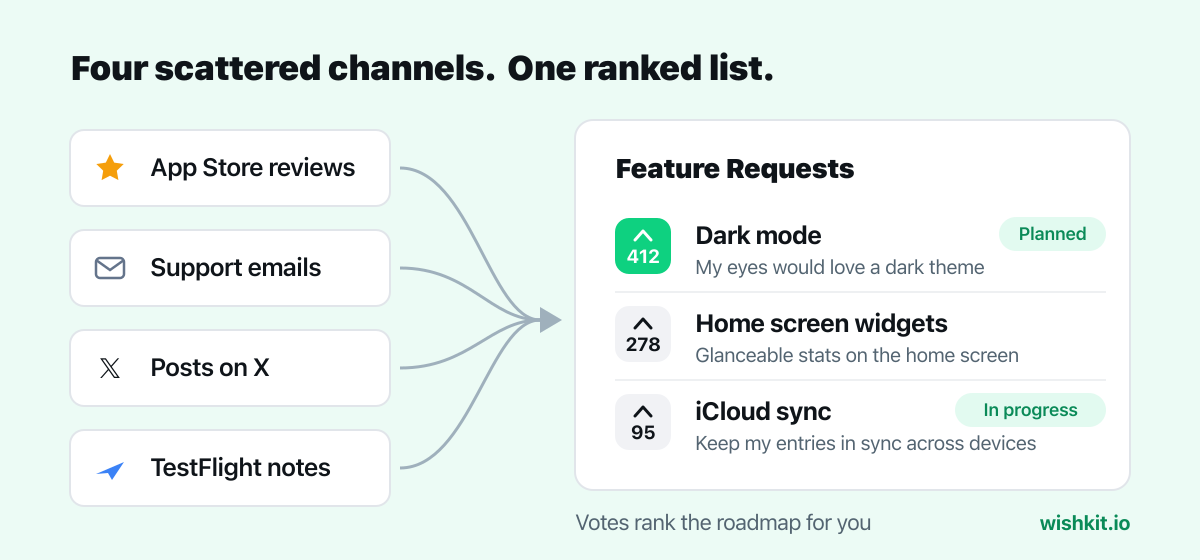
App Store reviews. "Great app, 3 stars until you add widgets." The most common channel and the worst one: you cannot reply meaningfully, the requester never sees your roadmap, and a feature wish costs you rating points. We wrote a separate guide on finding feature requests in App Store reviews.
Support email. Better, but requests drown between bug reports and refund questions, and no one else can say "I want that too", so every idea looks equally rare.
Social posts. Users increasingly ask in public, tagging your account on X with ideas. Free signal, easily lost in the timeline.
TestFlight feedback. Useful during betas, gone once you ship.
All four channels share the same flaw: requests are scattered, unranked, and invisible to other users.
A feature request board gives every idea one home. Users post requests, see what others asked for, and vote instead of writing duplicates. The vote count turns "someone wants X" into "412 people want X", which is a roadmap decision you can defend.
On iOS specifically, the board must live inside the app. Sending users to a website to leave feedback kills most of the submissions; a native screen one tap away keeps them. That is the difference between guessing and knowing.
WishKit gives you exactly this as a native SwiftUI component:
WishKit.configure(with: "your_key"), then show WishKit.FeedbackListView() from a settings row or toolbar button.The same SDK covers macOS, visionOS, watchOS and tvOS, and a two-line HTML embed puts the identical board on your website. Users vote once across all of them.
Sort by votes, decide with judgment. Votes rank demand; they do not rank effort or strategy. The practical loop: take the top handful by votes, veto what conflicts with your product direction, and ship the winner.
Use statuses honestly. Marking requests as planned, in progress, or completed shows users the board is alive. A board where things visibly ship collects more and better requests.
Merge duplicates. Ten variants of "dark mode please" split the vote and hide the demand. Merging them restores the real number.
When a request ships, everyone who voted for it can be notified automatically. That email turns "the app finally added it" into "they built what I asked for", which is exactly the moment users rewrite a 3-star review into a 5-star one.
And for the requests that arrive on X instead of in your app: WishKit can capture those too. Reply "@MyWishKit add this" under the post and it lands on your board with the rest.
Only via reviews, which you cannot organize or rank. Apple offers no feature-request mechanism, so the channel is yours to build into the app.
No. Feedback and feature-request screens are standard app functionality and countless apps on the App Store include them.
WishKit's free plan covers one project and core feature-request collection. Premium at $15 per month adds comments, automatic user notifications, and capturing requests from X.
Setup takes less than a minute. Free plan included, no credit card required.
Try WishKit for free