Apple's own numbers, what every status in App Store Connect means, when an expedited review is worth asking for, and what to do when a submission sits in Waiting for Review for days.
By Martin Lasek · Oct 5, 2026 · 8 min read
How long does App Store review take? Apple says it reviews at least half of all submissions within a day and nine in ten within two days. Most of that time a version sits in Waiting for Review. When you can't wait, Apple lets you request an expedited review, but only for a critical bug or an event with a date.
This guide covers Apple's figures, what every App Store Connect status means, how to expedite a review, what developers report when it takes longer, and what to do while you wait. Every rule is quoted from Apple's own pages, read on October 5, 2026.
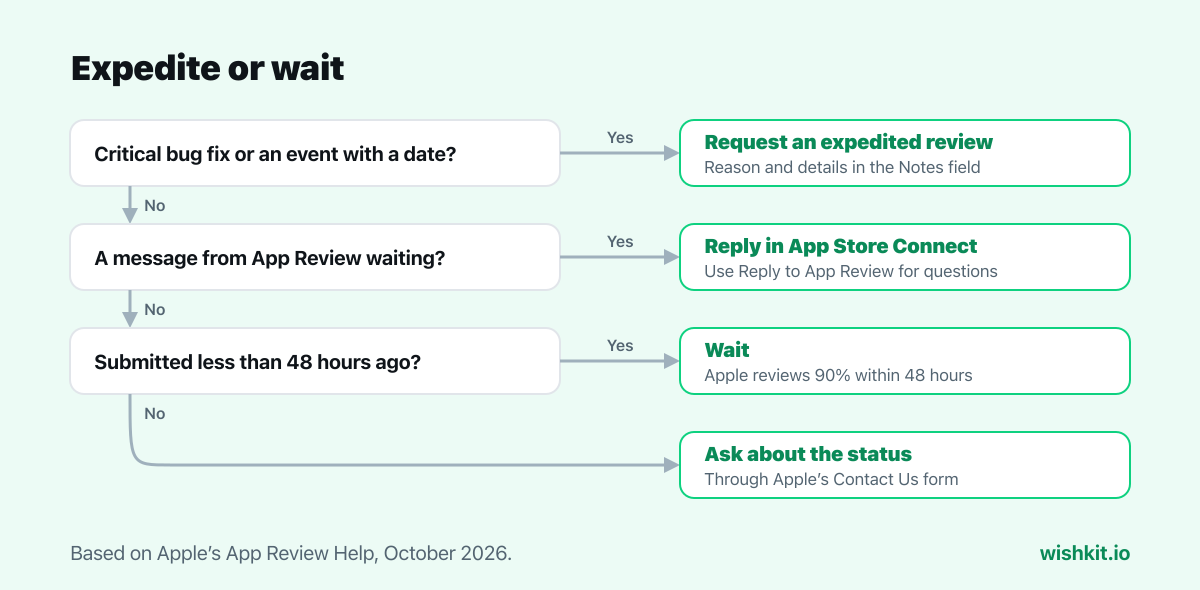
Apple reviews at least 50% of submissions in less than 24 hours and 90% in less than 48 hours. If yours has waited longer, check App Store Connect for a message from App Review first. For a critical bug fix or a dated event, request an expedited review after you submit, with the steps to reproduce or the event details in the Notes field.
"App Review works around the clock with the goal of reviewing at least 50% of submissions in less than 24 hours and 90% in less than 48 hours."
Read the numbers the other way round: one submission in ten takes longer than two days, and Apple doesn't say how much longer. Two things are known to push a review out. The first is an incomplete submission. In Apple's words: "If your submission is incomplete, review times may be delayed or your submission may not pass." The second is the holidays. In its last holiday notice, from December 2024, Apple kept accepting submissions but said "reviews may take longer to complete from December 20-26".
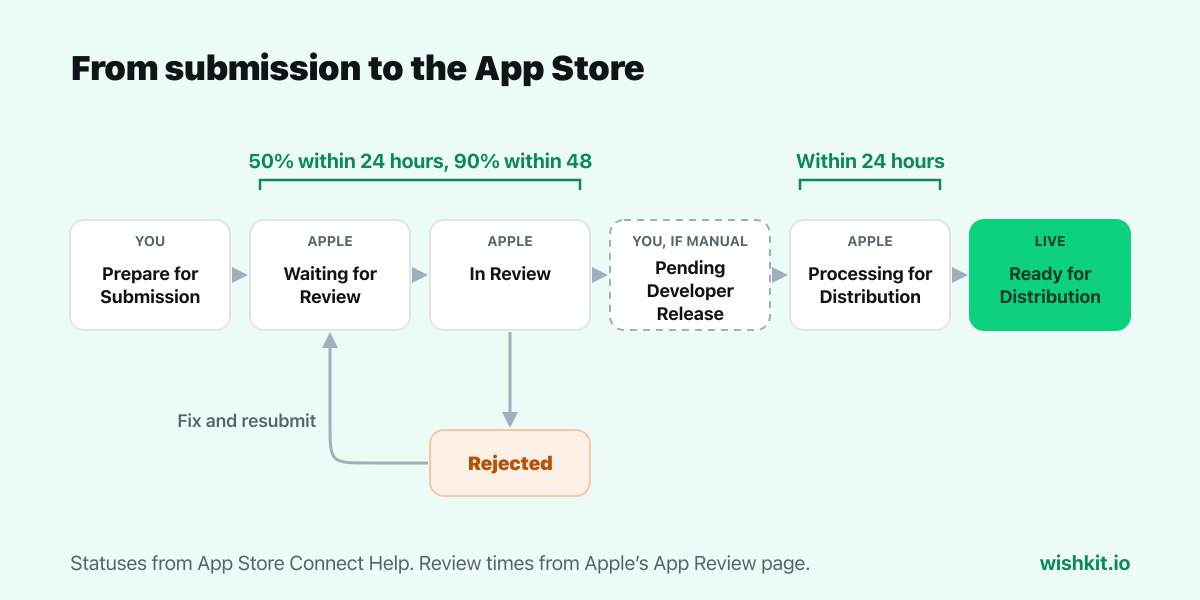
App Store Connect shows where a version stands with a colored status. Yellow means a process run by you or Apple is still going, red means you have to act, and green means the version is ready for distribution. These are the statuses a normal submission passes through, in Apple's names, from its status reference:
| Status | What it means | What you can do |
|---|---|---|
| Prepare for Submission | You created the version but haven't finished its information. | Add the build, screenshots and metadata. |
| Ready for Review | Everything required is filled in, but you haven't submitted yet. | Submit it, alone or together with In-App Events or custom product pages. |
| Waiting for Review | Apple has your submission but hasn't started on it. | Edit some information or remove the build from review. Screenshots and previews are locked. |
| In Review | App Review is checking your app. | Remove the build from review if you have to. |
| Pending Developer Release | Approved, and waiting for you because you chose manual release. | Release it whenever you're ready. |
| Processing for Distribution | Approved and being prepared for the store. | Wait. Apple says it's ready within 24 hours. |
| Ready for Distribution | Live on the App Store, as long as your agreements are in effect. | Nothing. The version is out. |
When something goes wrong, you see one of these instead:
"You can request the review of your app to be expedited if you face extenuating circumstances, such as fixing a critical bug in your app or releasing your app to coincide with an event you’re directly associated with."
So two cases qualify: a critical bug in the version that's live now, and an event your app is directly tied to. A launch date you picked yourself is not an event in Apple's sense. For events, Apple's advice is to plan ahead and schedule the release in App Store Connect.
Apple adds one more line on its help page: "Expedite requests should be reserved for matters of genuine urgency." It doesn't publish a limit on how many you can send.
Apple's numbers describe most submissions. The ones that miss them show up in the Apple Developer Forums. On October 5, 2026, 15 of the 21 newest threads under the App Review tag were about waiting. A few of them:
Read these with care. People post when a review is slow, not when it took six hours, so the forums show the bad cases rather than the typical one. Two lessons still hold. An approved expedite moves you up, but it doesn't come with a time. And a reply to an information request can leave a submission quiet for days.
A release about to go live is the right moment to give its new users a place to say what they want next. WishKit adds a feature request board to your iOS app with a few lines of SwiftUI, so requests from the people this release brings land in one ranked list instead of in your reviews. And once the version is live, ask happy users for a rating at the right moment with the App Store review prompt.
Apple says it reviews at least 50% of submissions in less than 24 hours and 90% in less than 48 hours. Incomplete submissions and the days around Christmas can take longer.
Submit the version for review, put the reason in the Notes field (steps to reproduce for a critical bug, or the event and its date), then fill in Apple's Request an Expedited App Review form. Apple only expedites for extenuating circumstances such as a critical bug fix or an event your app is tied to.
Apple has received your submission but hasn't started reviewing it. You can still edit some information or remove the build from review, but you can't change screenshots or app previews.
Most submissions leave it within two days. If yours hasn't, check App Store Connect for a message from App Review, then ask about the status through Apple's Contact Us form. Incomplete submissions and the holiday season are two causes of delay Apple names.
Apple asks for the steps to reproduce the bug on the version that is live now, so it has to be a problem your users hit today, not a new feature or an improvement.
No. It only changes when your app is reviewed. The version is still checked against the App Review Guidelines like any other submission.
Your version passed review and is waiting for you to release it. You see this status when you chose to release the version manually.
Setup takes less than a minute. Free plan included, no credit card required.
Try WishKit for free