Apple rejected more than two million app submissions in 2025. Most of them broke the same handful of rules. Here they are in Apple's own words, with what to check before you submit.
By Martin Lasek · Oct 8, 2026 · 7 min read
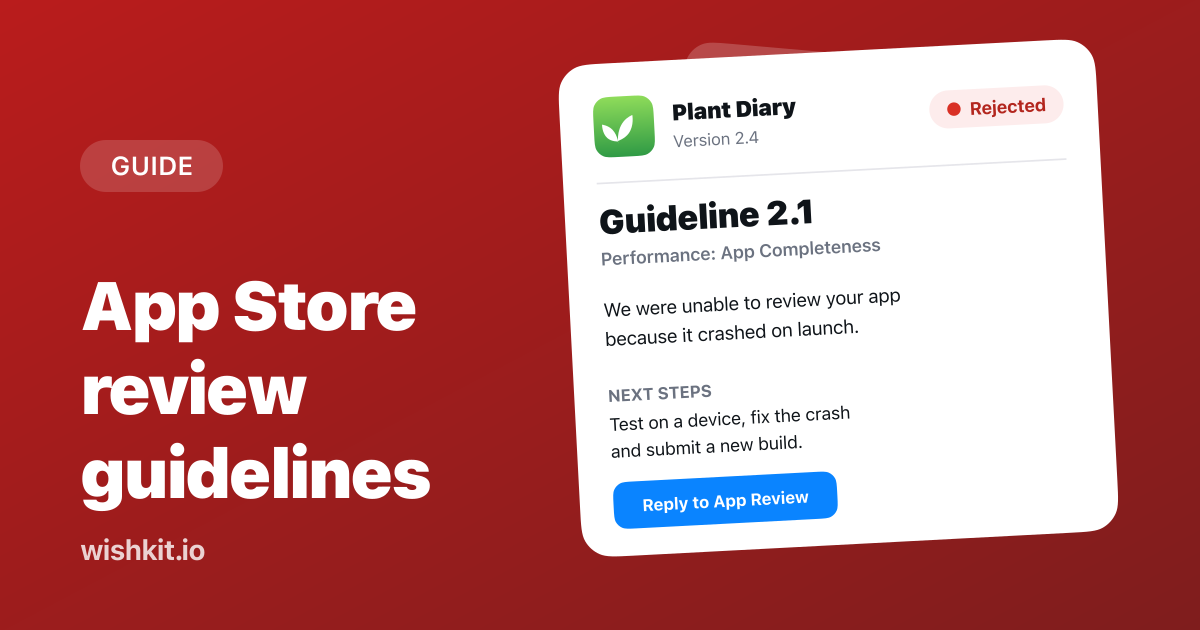
The App Store Review Guidelines are Apple's rules for every app on the App Store, grouped into five sections: Safety, Performance, Business, Design and Legal. App Review checks each submission against them, and a submission that breaks one is rejected with the number of the guideline it broke.
The full guidelines are long, and Apple last updated them on June 8, 2026. This guide covers the few that cause most rejections, quoted from that version, plus two that matter as soon as your app collects feedback from its users.
Most rejections come from guideline 2.1, App Completeness: crashes, placeholder content, broken links and a missing demo account. After that come inaccurate metadata (2.3), apps that do too little (4.2) or copy others (4.3), privacy problems (5.1.1) and selling digital features outside in-app purchase (3.1.1). Test on a real device, fill in the App Review Information section completely, and make your screenshots and description match the app.
Apple publishes a yearly App Store Transparency Report. In the 2025 report, App Review looked at 9,100,620 submissions and rejected 2,093,244 of them, about one in four. 387,087 submissions were approved after a rejection.
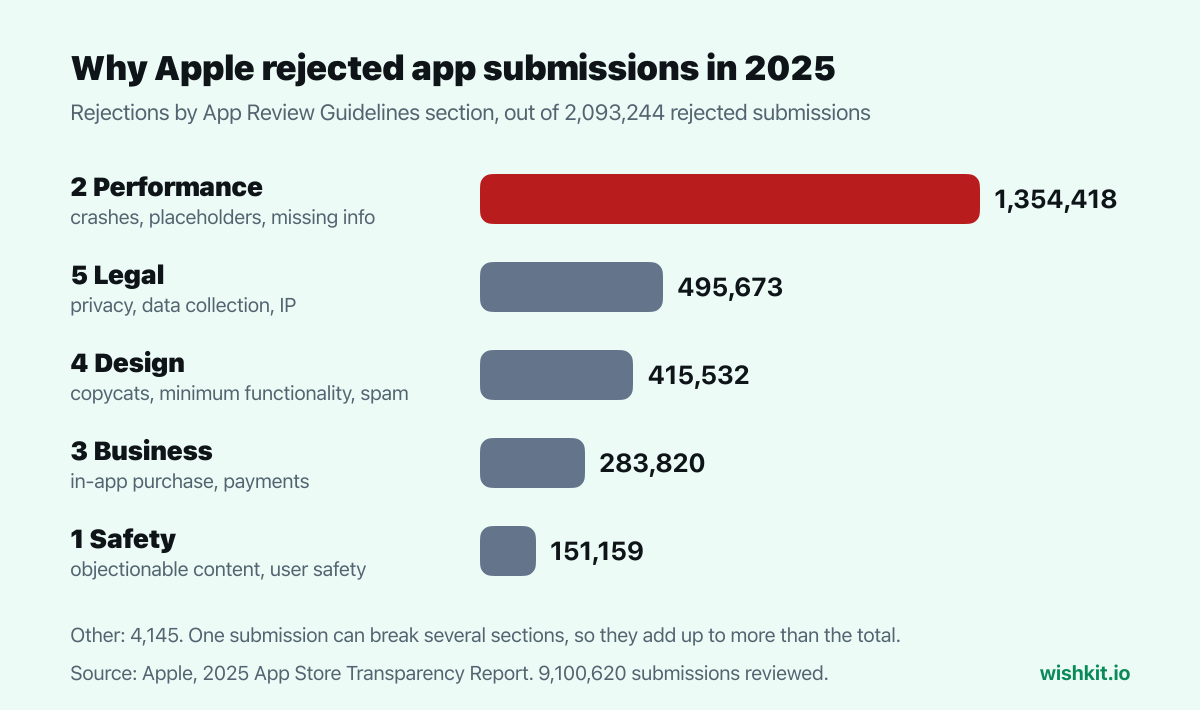
Performance, the section that starts with App Completeness, accounted for more rejections than all other sections combined. Apple says the same on its App Review page:
"On average, over 40% of unresolved issues are related to guideline 2.1: App Completeness, which covers crashes, placeholder content, incomplete information, and more."
So the cheapest way to pass review is to get 2.1 right. That's where we start.
"Make sure your app has been tested on-device for bugs and stability before you submit it, and include demo account info (and turn on your back-end service!) if your app includes a login."
Before you submit, check:
A TestFlight beta on real devices catches most of this before a reviewer does.
"Customers should know what they’re getting when they download or buy your app, so make sure all your app metadata, including privacy information, your app description, screenshots, and previews accurately reflect the app’s core experience and remember to keep them up-to-date with new versions."
Screenshots that show features the app doesn't have, or a description written for an older version, get rejected. One sub-rule is easy to miss: new features "must be described with specificity in the Notes for Review section of App Store Connect (generic descriptions will be rejected)." A line like "Bug fixes and improvements" in your review notes is not enough when a version adds something.
"Your app should include features, content, and UI that elevate it beyond a repackaged website. If your app is not particularly useful, unique, or “app-like,” it doesn’t belong on the App Store."
This is the rule that stops a website wrapped in a web view. Native navigation, offline behavior, notifications or anything else a browser can't do is what moves an app past it.
"Don’t submit apps that are indistinguishable from what's already widely available."
4.3 also forbids several Bundle IDs for the same app, like a separate app per city. Apple suggests one app with the variations unlocked by in-app purchase. If your app lives in a crowded category, say in the review notes what makes it different. Together with 4.2 and copycats, this counts toward the Design section in Apple's report.
"All apps must include a link to their privacy policy in the App Store Connect metadata field and within the app in an easily accessible manner."
The privacy policy has to say what data the app collects, how, and for what, and confirm that third parties, including SDKs, protect it the same way. The other common 5.1.1 rejection is the permission prompt: every request for access to the camera, location, contacts and the like needs a purpose string in Info.plist that explains clearly why the app needs it.
"If you want to unlock features or functionality within your app, (by way of example: subscriptions, in-game currencies, game levels, access to premium content, or unlocking a full version), you must use in-app purchase."
License keys, QR codes and your own payment screen for digital features are out. Apple also asks for a way to restore purchases. Physical goods and services used outside the app follow other rules in section 3.1.
Neither of these is among the most common rejections, but both apply as soon as your users can post or rate inside your app.
If users can post content that other users see, Apple requires four things:
"A method for filtering objectionable material from being posted to the app. A mechanism to report offensive content and timely responses to concerns. The ability to block abusive users from the service. Published contact information so users can easily reach you."
A public feature request board, where users read each other's ideas, is user-generated content. With WishKit, a new feature request stays pending until you approve it, and until then only the person who posted it can see it. Comments appear right away, and you can delete any of them from the dashboard. Whether your app meets 1.2 is App Review's call, so check all four points for your app as a whole, including the contact information on your support page.
"Use the provided API to prompt users to review your app; this functionality allows customers to provide an App Store rating and review without the inconvenience of leaving your app, and we will disallow custom review prompts."
No homemade "Rate us 5 stars" popups. Use Apple's prompt, which the SKStoreReviewController guide covers in SwiftUI and UIKit. The same guideline asks you to keep replies to reviews free of personal information, spam and marketing, which matters if you reply to App Store reviews.
One rule helps with urgent fixes. For apps that are already on the App Store, Apple says bug fixes "will not be delayed over guideline violations except for those related to legal or safety issues." If such a fix is rejected, tell App Review in App Store Connect that you want to use this process and will address the issue in your next submission.
On Apple's developer site at developer.apple.com/app-store/review/guidelines. The version quoted here was last updated on June 8, 2026.
Guideline 2.1, App Completeness. Apple says over 40% of unresolved issues relate to it, and in 2025 the Performance section it belongs to was behind 1,354,418 rejections.
In 2025, Apple rejected 2,093,244 of 9,100,620 submissions, about one in four. Apps are often submitted several times before they are approved, so this counts submissions, not apps.
Your app looks too much like apps that already exist, or you submitted several versions of the same app under different Bundle IDs. Combine variants into one app and explain in the review notes what makes it different.
The reviewer found the app unfinished: it crashed, showed placeholder content, had broken links, or they couldn't get past a login without a demo account. Fix what the message names and resubmit.
Yes. If you disagree with the outcome, Apple asks you to submit an appeal. Try replying to App Review in App Store Connect first, since many rejections clear up with an explanation.
Setup takes less than a minute. Free plan included, no credit card required.
Try WishKit for free