The required iPhone size changed, and most guides still say 6.9 inches. Here is every size from Apple's specification, what is required today, and what is coming in April 2027.
By Martin Lasek · Oct 8, 2026 · 7 min read
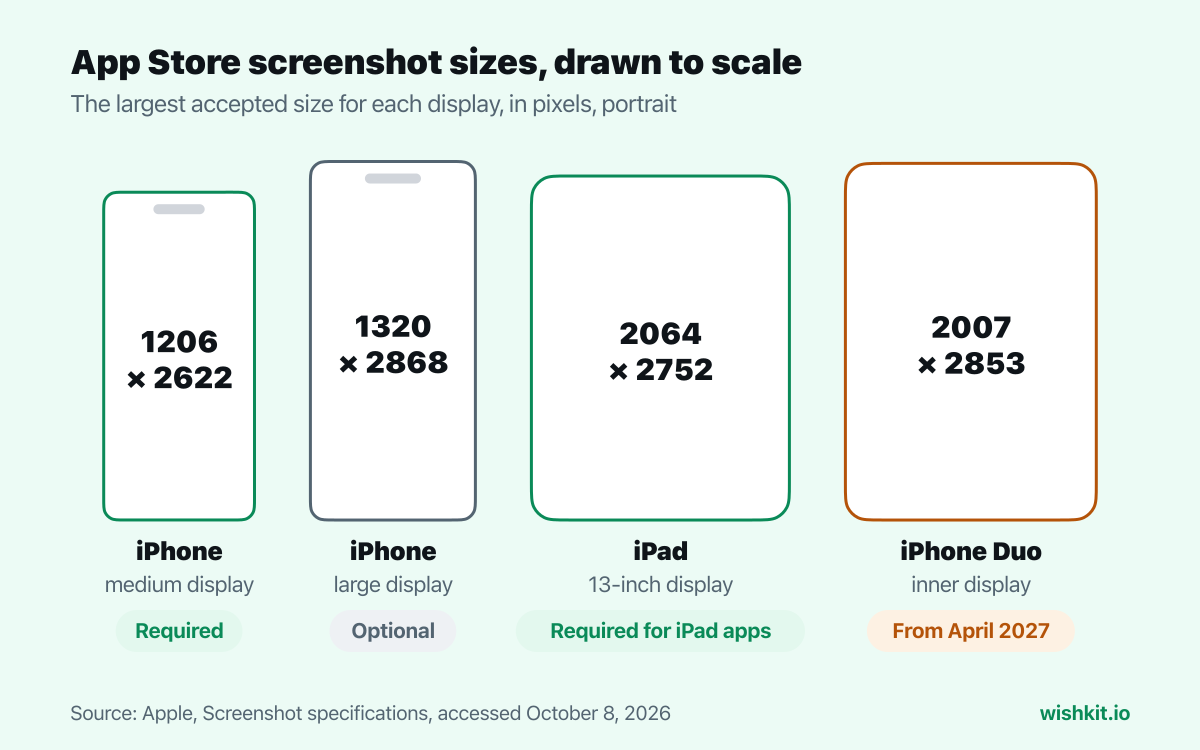
App Store Connect requires one set of iPhone screenshots at 1206 × 2622 or 1179 × 2556 pixels, the size Apple calls iPhone with Dynamic Island (medium display). If your app runs on iPad, add one set at 2064 × 2752 or 2048 × 2732 pixels for the 13-inch iPad. Every other App Store screenshot size is optional. You can upload up to 10 screenshots per size, as .jpeg, .jpg or .png, without transparency.
Since September 2024, one large iPhone set was enough. Apple's App Store Connect release notes said so on September 11, 2024:
"you’re only required to provide a single screenshot (6.5" or 6.9") for iPhone and single screenshot (13") for iPad with your app submission."
That is the rule most screenshot guides still teach. Apple's screenshot specifications now name a different size at the top of the page:
"iPhone: At least one screenshot for iPhone with Dynamic Island (medium display)."
"iPad (if your app supports iPadOS): At least one screenshot for iPad 13-inch display."
The page doesn't fully agree with itself. Its table further down still marks the 6.5-inch row as "Required if app runs on iPhone and screenshots for iPhone with Dynamic Island (large display) aren't provided", and the release notes announce no change. App Store Connect follows the new wording. When I opened the next version of my game, Momoko IO, in App Store Connect on October 8, 2026, the first iPhone tab was iPhone with Dynamic Island (medium display), and it listed only these sizes:
"For app screenshots, supported sizes include 2556 × 1179px, 1179 × 2556px, 2622 × 1206px and 1206 × 2622px."
So if you have a 1320 × 2868 set from last year, keep it for the large display slot and render a second set at 1206 × 2622 for the required one.
"If your app’s user interface is consistent across multiple device sizes and localizations, you only need to provide screenshots for the highest required resolution. App Store Connect automatically scales them down for smaller device sizes."
Each optional row in Apple's table names the row it borrows from when you leave it empty. Upload a size of its own only when the app looks different there, for example a layout that uses the extra width of the large display.
Portrait sizes in pixels. Landscape is the same pair swapped, so 1206 × 2622 becomes 2622 × 1206.
| Display | Devices | Sizes | Status |
|---|---|---|---|
| Dynamic Island, medium | iPhone 14 Pro, 15, 15 Pro, 16, 16 Pro, 17, 17 Pro, 18 Pro | 1206 × 2622 1179 × 2556 | Required |
| Dynamic Island, large | iPhone Air, 14 Pro Max, 15 Plus, 15 Pro Max, 16 Plus, 16 Pro Max, 17 Pro Max, 18 Pro Max | 1320 × 2868 1290 × 2796 1260 × 2736 | Optional |
| Face ID, large | iPhone XS Max, XR, 11, 11 Pro Max, 12 Pro Max, 13 Pro Max, 14 Plus | 1284 × 2778 1242 × 2688 | Optional |
| Face ID, medium | iPhone X, XS, 11 Pro, 12, 12 mini, 12 Pro, 13, 13 mini, 13 Pro, 14, 16e, 17e | 1170 × 2532 1125 × 2436 1080 × 2340 | Optional |
| Home button, large | iPhone 6 Plus, 6s Plus, 7 Plus, 8 Plus | 1242 × 2208 | Optional |
| Home button, medium | iPhone 6, 6s, 7, 8, SE (2nd and 3rd generation) | 750 × 1334 | Optional |
| Home button, 4-inch | iPhone 5, 5c, 5s, SE (1st generation) | 640 × 1136 640 × 1096 without status bar | Optional |
| Home button, 3.5-inch | iPhone 4, 4s | 640 × 960 640 × 920 without status bar | Optional |
| iPhone Duo | iPhone Duo | 1398 × 2034 outer display 2007 × 2853 inner display | From April 2027 |
| Display | Devices | Sizes | Status |
|---|---|---|---|
| 13-inch | iPad Pro 13-inch and 12.9-inch (most generations), iPad Air 13-inch | 2064 × 2752 2048 × 2732 | Required for iPad apps |
| 12.9-inch | iPad Pro (2nd generation) | 2048 × 2732 | Optional |
| 11-inch | iPad Pro 11-inch, iPad Air 11-inch, iPad (10th generation, A16), iPad mini (6th generation, A17 Pro) | 1488 × 2266 1668 × 2420 1668 × 2388 1640 × 2360 | Optional |
| 10.5-inch | iPad Pro 10.5-inch, iPad Air (3rd generation), iPad (7th to 9th generation) | 1668 × 2224 | Optional |
| 9.7-inch | Older iPad, iPad Air and iPad mini models | 1536 × 2048 1536 × 2008 without status bar 768 × 1024 768 × 1004 without status bar | Optional |
| Platform | Sizes | Status |
|---|---|---|
| Mac | One of 1280 × 800, 1440 × 900, 2560 × 1600, 2880 × 1800 (16:10) | Required for Mac apps |
| Apple TV | 1920 × 1080 or 3840 × 2160 | Required for Apple TV apps |
| Apple Vision Pro | 3840 × 2160 | Required for Apple Vision Pro apps |
| Apple Watch | 422 × 514 (Ultra 3, Ultra 4), 410 × 502 (Ultra, Ultra 2), 416 × 496 (Series 10 to 12), 396 × 484 (Series 7 to 9), 368 × 448 (Series 4 to 6, SE), 312 × 390 (Series 1 to 3) | Required for Apple Watch apps |
For Apple Watch, pick one size and use it in every language. Apple asks for the same Apple Watch screenshot size "consistently across all localizations for the app".
Apple added iPhone Duo to the specification in September 2026, with two sizes: 1398 × 2034 for the outer display and 2007 × 2853 for the inner one. The note on that row reads:
"Starting in April 2027, screenshots will be required for any app using the iOS 27.1 SDK or later."
The release notes from October 5, 2026 are broader: "Starting April 2027, any apps or games submitted will need to include screenshots for iPhone Duo." Either way, plan a Duo set before your first submission in April 2027.
The simulator of an iPhone 16 Pro or 17 Pro has a medium display at 1206 × 2622, so its screenshots fit the required slot as they are. Run your app there and choose File, Save Screen. To get Apple's clean status bar first, override it from Terminal:
1 xcrun simctl status_bar booted override --time "9:41" \
2     --batteryState charged --batteryLevel 100 \
3     --cellularBars 4 --wifiBars 3
If a PNG is rejected for transparency, converting it to JPEG drops the alpha channel. On a Mac, sips does it without opening an app:
1 sips -s format jpeg screenshot.png --out screenshot.jpg
Screenshots go up with the rest of a version's metadata. The same version needs release notes, and you can roll it out with a phased release. Then comes the question of what the next version should show. WishKit collects feature requests inside your app and lets users vote, so the screens you add next are the ones people asked for.
The required iPhone size is 1206 × 2622 or 1179 × 2556 pixels in portrait. iPad apps also need 2064 × 2752 or 2048 × 2732 pixels. Every other size is optional.
No. Apple's specification now names the medium display as the required iPhone size, and App Store Connect's iPhone tab for it lists only 1179 × 2556 and 1206 × 2622. A 1320 × 2868 set can still go in the optional large display slot.
No. App Store Connect scales your screenshots for the sizes you leave empty. Upload extra sizes only where your app looks different.
Only if your app runs on iPad. Then the 13-inch size, 2064 × 2752 or 2048 × 2732, is required.
Up to 10 per device size, and at least one.
Yes. Every size has a landscape version with width and height swapped, for example 2622 × 1206 for the required iPhone size.
From April 2027. Apple's specification ties it to apps using the iOS 27.1 SDK or later, and its release notes say any app submitted from then on.
Setup takes less than a minute. Free plan included, no credit card required.
Try WishKit for free