A reply can turn a 1 star review into a second chance. It only works if you see the review while the reviewer still cares.
By Martin Lasek · Sep 22, 2026 · 8 min read
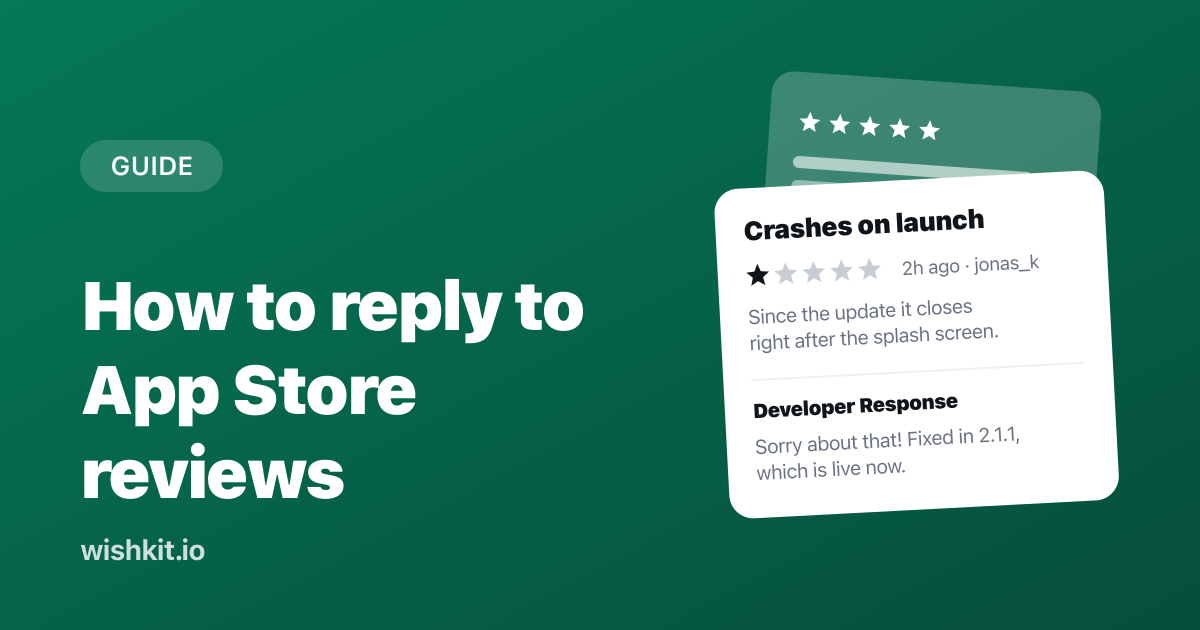
Someone installs your app, hits a bug on the first screen, and leaves one star. You find the review nine days later while looking for something else. By then they have deleted the app, and the review sits at the top of your product page for every new visitor to read.
Replying fixes more of that than most developers expect. This guide covers how to reply to App Store reviews, how to write a reply that helps, and how to make sure a 1 star review reaches you within the hour instead of within the week.
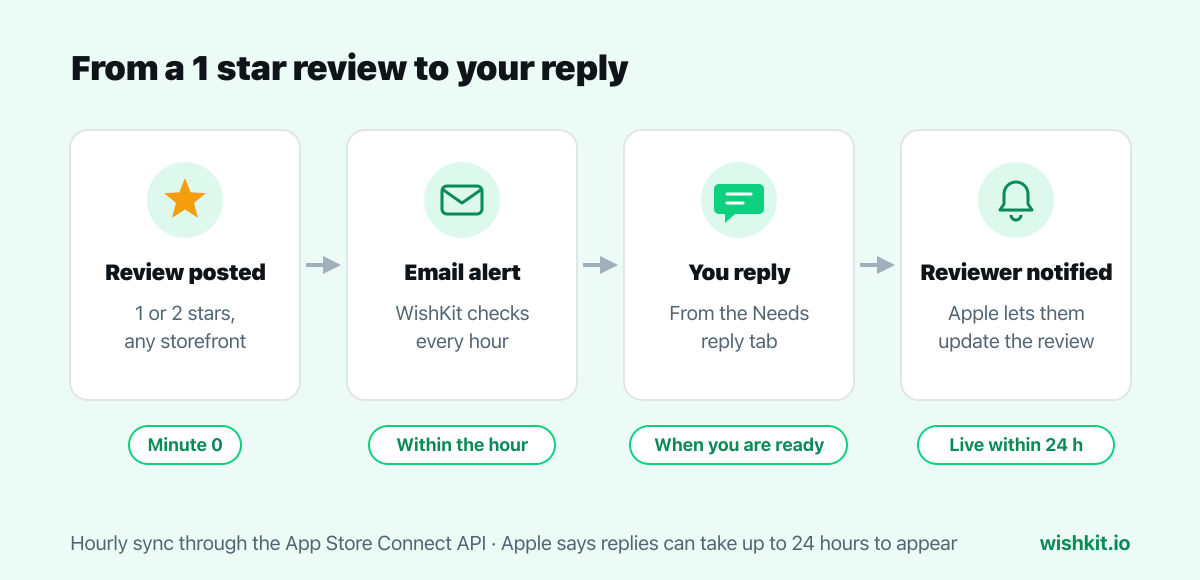
You can reply to any App Store review in App Store Connect under Ratings and Reviews, or through the App Store Connect API. Each review gets one public response, which you can edit or delete later. Replies can take up to 24 hours to appear on the App Store, and the reviewer is notified when they do.
A reply is public, it sits right under the review, and it reaches the person who wrote it. Apple says so directly on its developer page about ratings and reviews:
"When you respond, the reviewer is notified and has the option to update their review."
"You can respond to all reviews of your app, regardless of when they were written, in App Store Connect."
"Addressing feedback directly on your App Store product page can help you create a better user experience and improve your app's rating."
That notification is the whole point. A reviewer who wrote "crashes on launch" and then reads "fixed in 2.1.1, sorry about that" has a reason to try again and update the review. And even when they do not, the next person reading your product page sees a developer who shows up.
The response shows as pending until it goes live. To change it, click Edit Response on the same review. You need the Account Holder, Admin, or Customer Support role to reply.
This works well when you check it regularly. The trouble is the word regularly. Reviews come in from every storefront at any hour, and the bad ones are the ones you most want to answer quickly and least want to go looking for.
WishKit connects to App Store Connect with an API key and pulls your reviews into the same dashboard as your feedback board. Here is the flow it is built for:
In App Store Connect, under Users and Access, then Integrations, create an API key with the Admin role, then download the .p8 file. On the WishKit Integrations page, upload the file and paste the Issuer ID. WishKit reads the Key ID from the file name and checks the key against Apple right away, so a typo shows up as an error on the spot rather than as an empty page later.
Every app the key can see is listed. If the bundle ID matches the app you already use WishKit in, it links to that project automatically, and the first sync pulls in the last year of reviews, up to 1,000 of them. The key is stored encrypted, and disconnecting deletes it along with the synced reviews.
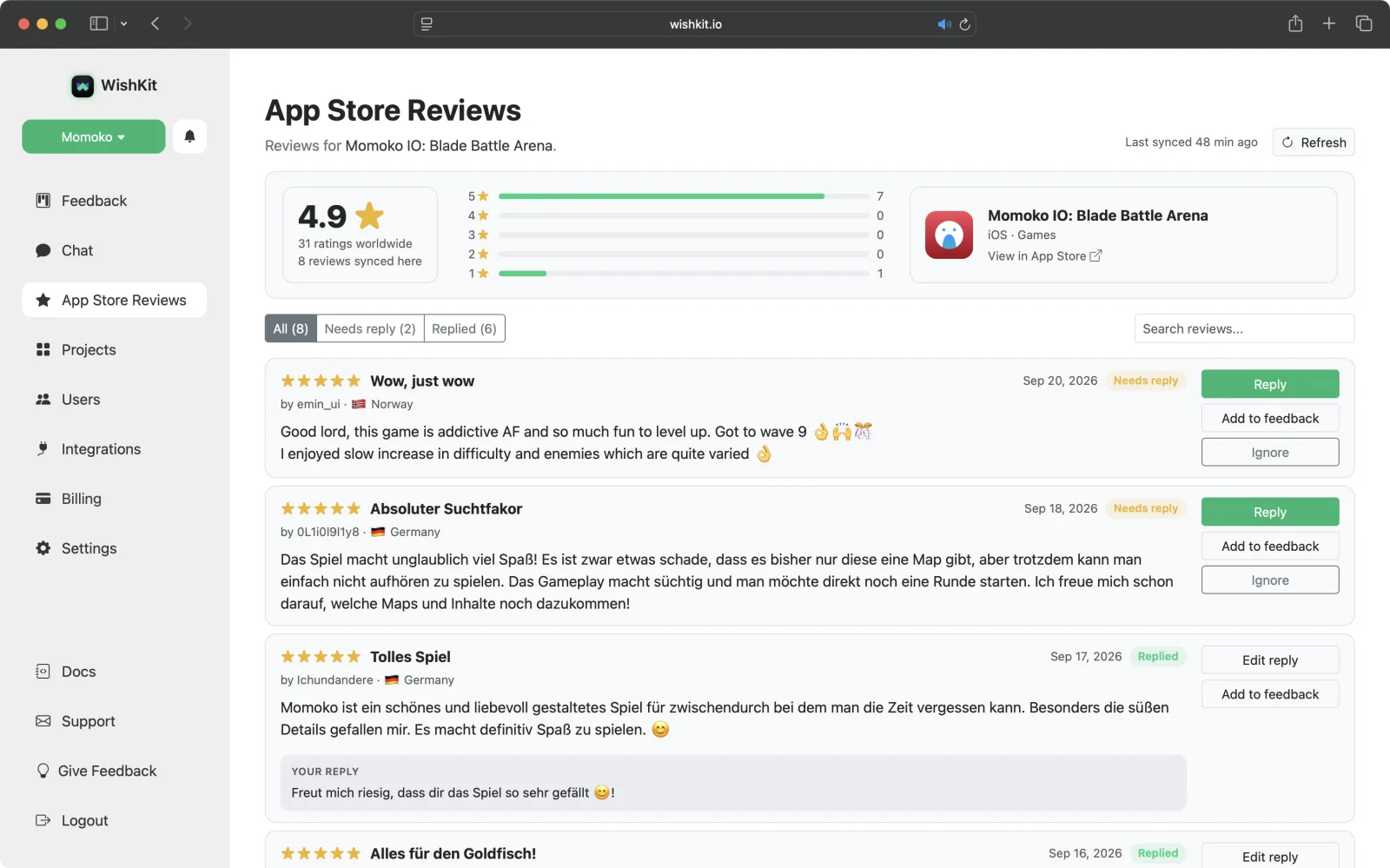
Reviews from all storefronts land in one list, newest first, each with the reviewer's country. The tabs split them into Needs reply, Replied, and Ignored. Click a bar in the star chart to see only the 1 star reviews, or search across titles, text, nicknames, and countries.
Reply opens a text box under the review. Your response goes to Apple through the App Store Connect API, shows as Reply pending until Apple publishes it, and then moves to Replied. Edit reply replaces it, since Apple keeps one response per review. Replies you post directly in App Store Connect show up in WishKit too, within the hour on recent reviews and within a day on older ones, or right away when you click Refresh.
Ignore is for reviews that need no answer, like "great app" with five stars. They drop out of Needs reply, so that tab stays an honest to-do list.
WishKit checks App Store Connect for new reviews every hour. When a new review has one or two stars, you get an email with the review text and a button that opens the Needs reply tab.
A weekly summary email lists every new review, the low ones included. New reviews also show up in the notification bell in the dashboard. Both emails are on by default and each can be turned off in Settings under Notifications. Reviews older than seven days are never emailed, so connecting an app with a long history does not flood your inbox.
Four common reviews and a reply to each. The reviews are made up, the kind every app gets. The complaint gets a fix and a version number, the request gets a place to vote, the wrong claim gets one polite correction, and the praise gets a real thank you.
Crashes on launch
Crashes every time I open it on my iPad. Deleted.
Developer Response1d ago
Sorry about that, and thank you for telling us. The iPad crash on launch is fixed in version 2.1.1, which is live now. If it still happens after updating, write to support@yourapp.com and I will look at it myself.
Almost perfect
Love it, but I really need widgets. Would be five stars then.
Developer Response4d ago
Thank you! Widgets are one of the most requested features right now. You can vote for them and follow the progress on the feedback board inside the app, under Settings, then Feedback.
Rip off
Why do I have to pay to export my data? Rip off.
Developer Response6d ago
Export is free for everyone. You find it under Settings, then Export. I am sorry it was hard to find, and the next update makes it easier to spot.
So calm
Such a calm app. The reminders never feel pushy and the design is beautiful. Please never add ads.
Developer Response2w ago
Thank you for taking the time to write this. Calm is exactly what we were going for, and no ads, promised.
"Would be five stars if it had widgets" is a feature request with a rating attached. Add to feedback turns the review into a request on your WishKit board, with the title and text filled in from the review and the reviewer's vote already counted. It arrives as pending, so nothing becomes public until you approve it. Then reply to the review with a note that it is on the board.
For the full method of finding these requests, counting them, and deciding what to build, see how to find feature requests in App Store reviews.
Reading and filtering reviews, the alert emails, and the weekly summary are included on every plan, including Free. Replying and turning reviews into feature requests are part of Premium, which is $15 a month or $12.50 a month billed yearly, with the feedback board, in-app chat, and unlimited users on the same flat price.
Free
$0 / mo
Premium
$15 / mo
Try WishKit with the app you already have. Connecting reviews needs one API key and no app update, and the setup for the in-app feedback board is on the iOS docs page.
Yes. In App Store Connect, open your app, go to Ratings and Reviews, and click Reply next to the review. You can also reply through the App Store Connect API, which is how tools like WishKit post replies for you.
Yes. Apple notifies the reviewer when you respond, and they can update their review. The reply is also public on your product page under the review.
Up to 24 hours. Until then it shows as pending in App Store Connect, and as Reply pending in WishKit.
Yes, both, in App Store Connect under Edit Response. Only the latest version is shown, marked as edited. WishKit can edit a reply but not delete one.
Yes. Apple lets you respond to any review of your app, no matter when it was written.
Connect your app to WishKit with an App Store Connect API key. It checks for new reviews every hour and emails you when one has one or two stars, with a link straight to the reply box.
WishKit lets your users request features and vote on them, in your app or on your website, so you know what to build next.
Try WishKit for freeFree plan included, no credit card required.
