Apple draws the prompt, decides whether it appears, and shows it at most three times a year. Your part is picking the moment.
By Martin Lasek · Oct 5, 2026 · 8 min read
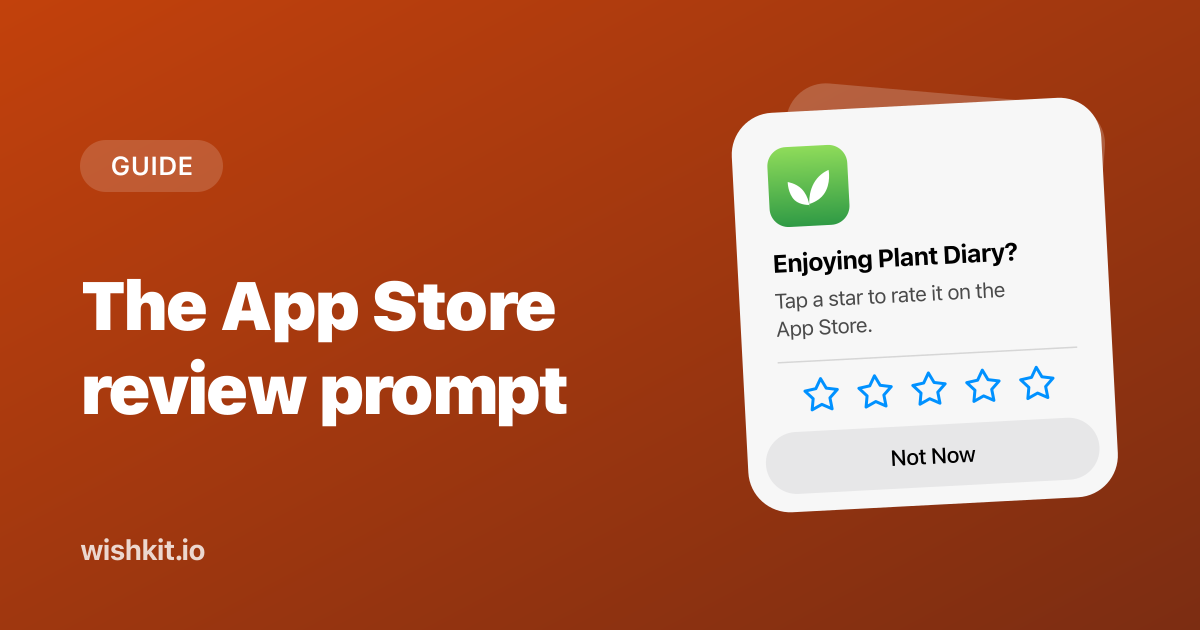
The App Store review prompt is the small popup that asks "Enjoying Plant Diary?" and lets someone rate your app with one tap, without leaving it. For years you showed it with SKStoreReviewController. Apple deprecated that class in iOS 18, and the replacement is a single line in SwiftUI or UIKit.
This guide covers the code for both, the limits Apple puts on the prompt, where to call it and where never to, and the Rate row every app should have in its settings. Plant Diary is a made-up app for the examples.
In SwiftUI, read @Environment(\.requestReview) and call it. In UIKit, call AppStore.requestReview(in:) with your window scene. Both need iOS 16 and both replace SKStoreReviewController. iOS shows the prompt at most three times in 365 days per device, never in TestFlight, and decides by itself whether a call shows anything. So call it right after a success, never on launch and never from a button.
Enjoying Plant Diary?
You can't change a word of it. Apple's design guidelines describe a prompt "that asks for a rating and an optional written review", which people answer or dismiss "with a single tap or click". The person never leaves your app, and your app never learns what they tapped, because the call returns nothing.
SwiftUI hands you a RequestReviewAction through the environment, and you call it like a function. This view asks after the fifth logged watering, once per app version, two seconds after the success screen appears. That is the same pattern as Apple's own sample code.
1 import StoreKit
2 import SwiftUI
3
4 struct WateringDoneView: View {
5     @Environment(\.requestReview) private var requestReview
6     @AppStorage("wateringCount") private var wateringCount = 0
7     @AppStorage("promptedVersion") private var promptedVersion = ""
8
9     var body: some View {
10         Text("All plants watered")
11             .task { await askForReviewIfReady() }
12     }
13
14     private func askForReviewIfReady() async {
15         let info = Bundle.main.infoDictionary
16         let version = info?["CFBundleShortVersionString"] as? String ?? ""
17         guard wateringCount >= 5, version != promptedVersion else { return }
18
19         // Let the success screen sink in before the prompt covers it.
20         try? await Task.sleep(for: .seconds(2))
21         guard !Task.isCancelled else { return }
22
23         requestReview()
24         promptedVersion = version
25     }
26 }
wateringCount goes up by one wherever the app saves a watering. Remembering the version keeps one person from being asked twice about the same release, and the pause lets them see the success screen before the prompt covers it. If they leave the screen during the pause, the task is cancelled and nothing is shown. The file needs import StoreKit, because the environment value comes from StoreKit, not SwiftUI.
In UIKit the replacement is AppStore.requestReview(in:). It takes the window scene your view lives in.
1 import StoreKit
2 import UIKit
3
4 final class WateringDoneViewController: UIViewController {
5     override func viewDidAppear(_ animated: Bool) {
6         super.viewDidAppear(animated)
7
8         guard let scene = view.window?.windowScene else { return }
9         AppStore.requestReview(in: scene)
10     }
11 }
viewDidAppear is the right moment for a screen that only appears after a success, like a finished export or a completed order. Put the same checks in front of the call as in the SwiftUI version.
Apple deprecated SKStoreReviewController in iOS 18. The class documentation now says "Use RequestReviewAction instead." and the method page says "Use AppStore.requestReview(in:)." Deprecated code still builds, with a warning, so this is cleanup rather than an emergency.
| Call | Available from | Status |
|---|---|---|
SKStoreReviewController.requestReview() | iOS 10.3 | Deprecated in iOS 14 |
SKStoreReviewController.requestReview(in:) | iOS 14 | Deprecated in iOS 18 |
AppStore.requestReview(in:) (UIKit) | iOS 16 | Current |
@Environment(\.requestReview) (SwiftUI) | iOS 16 | Current |
If your app still supports iOS 15, keep the old call behind an availability check until you drop it:
1 if #available(iOS 16, *) {
2     AppStore.requestReview(in: scene)
3 } else {
4     SKStoreReviewController.requestReview(in: scene)
5 }
Every call is a request, not a command. Apple's documentation lists the rules StoreKit follows:
"If the person hasn’t rated or reviewed your app on this device, StoreKit displays the ratings and review request a maximum of three times within a 365-day period."
"If the person has rated or reviewed your app on this device, StoreKit displays the ratings and review request if the app version is new, and if more than 365 days have passed since the person’s previous review."
"When your app calls this method while it’s in development mode, StoreKit always displays the rating and review request view, so you can test the user interface and experience. However, this method has no effect in apps that you distribute for beta testing using TestFlight."
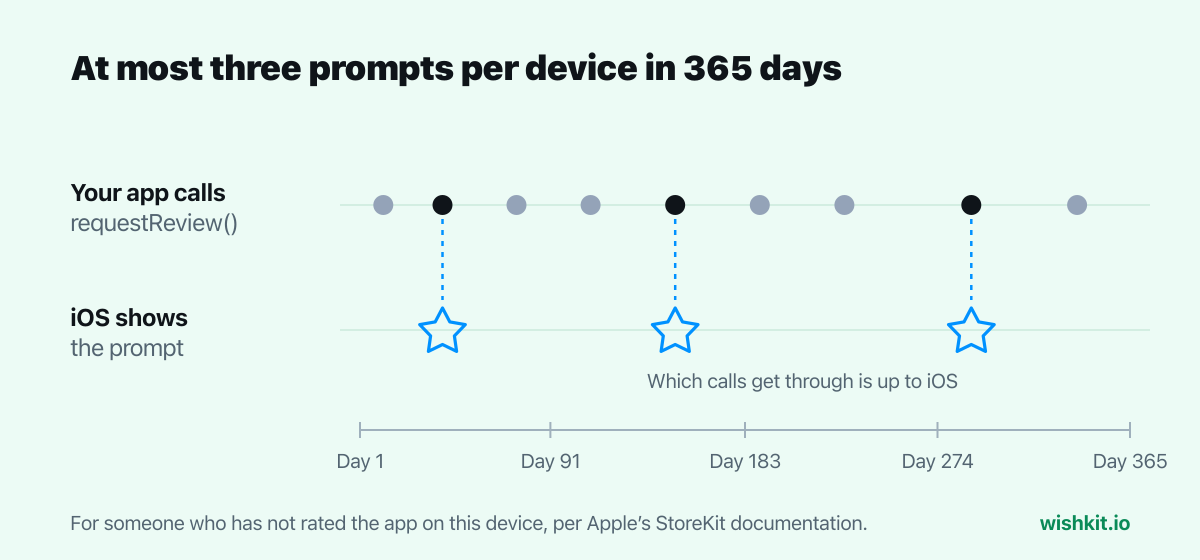
Three things follow from that. You can't count on any single call to show the prompt, so pick several good moments rather than one perfect one. Someone who rated version 2.0 won't be asked again until there is a new version and a year has passed. And testing is easy from Xcode but impossible in TestFlight, where the call does nothing, so a beta tester who never sees the prompt is not a bug report.
Apple's Human Interface Guidelines are blunt about timing:
"Ask for a rating only after people have demonstrated engagement with your app or game."
"Avoid asking for a rating on first launch or during onboarding, because people haven’t had enough time to gain a clear understanding of your app’s value or form an opinion."
"Avoid pestering people. Repeated rating requests can be irritating, and may even negatively influence people’s opinion of your app."
For people who want to rate on their own terms, add a settings row that opens the review page in the App Store. It has no limit, and Apple suggests it: "To make it easier for people to leave reviews, you may include a persistent link to your App Store product page in your app’s settings or configuration screens." Add ?action=write-review to your product page URL and the App Store opens straight on the page for writing a review.
Settings
1 import SwiftUI
2 import WishKit
3
4 struct SettingsView: View {
5     // Your App Store ID is the number in your product page URL.
6     private let writeReviewURL = URL(
7         string: "https://apps.apple.com/app/id1234567890?action=write-review"
8     )
9
10     var body: some View {
11         List {
12             Section {
13                 if let writeReviewURL {
14                     Link(destination: writeReviewURL) {
15                         Label("Rate Plant Diary", systemImage: "star")
16                     }
17                 }
18                 NavigationLink {
19                     WishKit.FeedbackListView()
20                 } label: {
21                     Label("Suggest a Feature", systemImage: "lightbulb")
22                 }
23             }
24         }
25         .navigationTitle("Settings")
26     }
27 }
Your App Store ID is the number at the end of your product page URL, for example the 1234567890 in apps.apple.com/app/id1234567890. The second row is the other half of the conversation. A rating says how someone feels about your app. A feature request says what they want next, and a review box is a poor place to say it. Suggest a Feature opens a WishKit board where people post ideas and vote on each other's, and setting it up takes a few minutes. Show both rows to everyone. They answer different questions, and neither should decide who gets to see the other.
You can design your own alert for almost anything, but not for this. App Review Guideline 5.6.1 says, in one sentence:
"Use the provided API to prompt users to review your app"
"…this functionality allows customers to provide an App Store rating and review without the inconvenience of leaving your app, and we will disallow custom review prompts."
That rules out your own star picker that sends people to the App Store. It also makes a common trick risky: a "Do you like the app?" screen that only shows Apple's prompt to people who tap yes. The guideline doesn't name that pattern, but it is a custom step in front of the review prompt, and it filters out the people whose ratings you most need to hear. I'd leave it out.
People can turn the prompt off for every app at once. On iPhone the switch is in Settings, then Apps, then App Store, called In-App Ratings & Reviews, which Apple describes as "Let apps ask for your feedback." With it off, your calls never show anything for that person. That is one more reason for the Rate row: it is the one path to a review that always works.
Yes. Apple deprecated it in iOS 18, iPadOS 18, macOS 15 and visionOS 2. Use AppStore.requestReview(in:) in UIKit or the requestReview environment value in SwiftUI, both available since iOS 16.
At most three times in 365 days per device for someone who hasn't rated your app. After they rate it, only for a new version of the app and only when more than 365 days have passed since their last review.
Apple switches it off there on purpose. The call has no effect in TestFlight builds, while builds you run from Xcode show the prompt every time, so test it from Xcode.
No. The call returns nothing, and StoreKit never tells your app whether the prompt appeared or what was tapped. Ratings and reviews arrive in App Store Connect, where you can also reply to App Store reviews.
No. Apple says not to call it from a button, because it may show nothing. Use the action=write-review link for buttons and settings rows instead.
Yes. The SwiftUI action works on iPadOS 16, macOS 13 and visionOS. In AppKit, AppStore.requestReview(in:) takes a view controller instead of a window scene.
Setup takes less than a minute. Free plan included, no credit card required.
Try WishKit for free