Four replies, when to send each one, and who gets it. A routine for telling people what happened to their request, without a spreadsheet.
By Martin Lasek · Oct 6, 2026 · 9 min read
Someone asks for a feature. Maybe you build it, maybe you don't. Either way, they rarely hear back, so the next time they have an idea, they keep it to themselves. Closing the feedback loop fixes that. It costs four short messages per request and no extra tools, as long as you know when each one is due and who should get it.
Google gave Android developers review replies back in 2012 for exactly this. One of the reasons it named was to "let users know when their feature requests have been implemented."
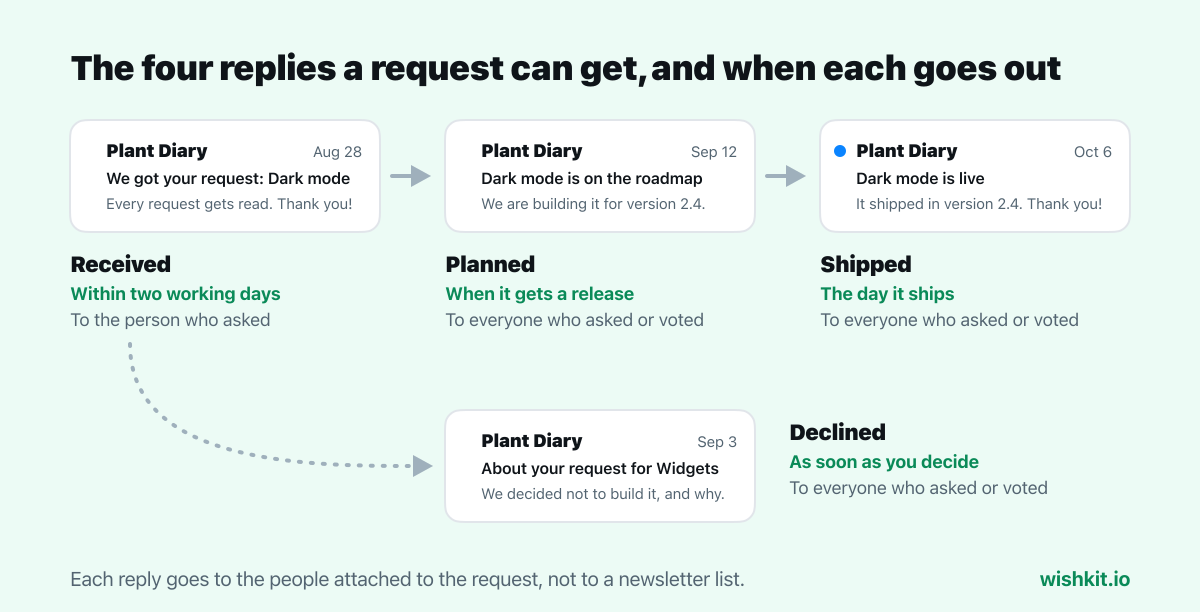
To close the feedback loop on feature requests, reply four times at most: when you receive a request, when it is planned, when it ships and, instead of the last two, when you decide against it. Send the first within two working days, the others on the day the status changes, and send each one to everyone who asked or voted, not only to the first person.
The phrase comes from customer experience, where Bain & Company built its Net Promoter System around it:
"To close the loop is not only to let customers know that you have heard their feedback but also to bring the customer’s voice right inside the organization."
Bain splits it in two. The inner loop is the reply to one person. The outer loop is the change a company makes because many people asked, and Bain counts "even product features" among them. A feature request runs through both: one person asks, the request becomes part of your product decisions, and the loop only closes when the people who asked hear the outcome.
The wording for each one is in the feature request template. This is about timing and recipients.
The first reply only has to say that a person read it. Send it to the person who asked, and include one question if anything is unclear, such as how they would use it. If the request already exists, say so and tell them their vote was added to it. That reply does double duty: it closes the first loop and teaches people to search the board before they post.
If you already know the answer, skip ahead. A request you will never build should get the declined reply right away, not a friendly acknowledgement followed by months of silence.
Wait until the request has a place in a release, not just a spot on a wish list. Then tell everyone who asked or voted. Name the release or the season if you are confident, and leave out exact dates. A slipped date undoes the goodwill the reply was meant to earn. The guide to feature prioritization covers how requests get to this point.
This is the reply people remember, so send it to everyone attached to the request: the person who asked, every voter and everyone who commented. For an iOS app, "the day it ships" means the day the update is live on the App Store, not the day you submit it. App Review can take a day or two, and an "it's live" message for an update nobody can download yet makes things worse.
The reply most teams skip, and the one that earns the most trust. Send it to everyone who asked or voted, give one honest reason, and offer a workaround if there is one. "Not now" is a fine answer if it is true. Then tell people what would change your mind, for example more votes from paying users.
| Reply | When | To whom | Status change |
|---|---|---|---|
| Received | Within two working days | The person who asked | New request |
| Planned | When it gets a release | Everyone who asked or voted | Moved to Planned |
| Shipped | The day the update is live | Everyone who asked, voted or commented | Moved to Completed |
| Declined | As soon as you decide | Everyone who asked or voted | Moved to Rejected |
The same request arrives through every channel you have, and each person who sent it is owed the replies. Answer them where they asked:
Then put them all on one request. Merge duplicates into a single entry and note where each one came from, so that a status change reaches everyone at once instead of five people out of twelve.
The spreadsheet version breaks at the shipped reply, because by then nobody remembers the four support emails and the review from March. A routine that holds up:
WishKit is a feedback board for websites, and for iOS apps through a native SDK. This is what it does for each reply today, and what is still up to you:
On Premium, merging duplicates carries the voters over to the request you keep. App Store reviews can be answered from the same dashboard and turned into requests. Premium is $15 a month flat, or $12.50 billed yearly, with unlimited users.
It means telling the people who gave you feedback what happened to it. For feature requests, that is a reply when you receive the request, when you plan it, when it ships, or when you decide not to build it.
Acknowledge it within two working days. Send the later replies on the day the status changes: when it gets a release, when the update is live, or when you decide against it.
Yes. Send it to everyone who asked or voted, with one honest reason and a workaround if there is one. A clear no costs less goodwill than a request that disappears.
Reply where they asked: a developer response for App Store reviews, a reply for public posts, and a visible status on your feedback board or in the app for everyone else. Ask for an optional email in the request form to make the next loop easier.
In Bain's Net Promoter System, the inner loop is following up with one customer, and the outer loop is the change a company makes because many customers asked for it. A feature request runs through both.
Setup takes less than a minute. Free plan included, no credit card required.
Try WishKit for free