Every roadmap below was live and recently updated when we checked it in October 2026, including six from apps on iPhone and Mac.
By Martin Lasek · Oct 8, 2026 · 10 min read
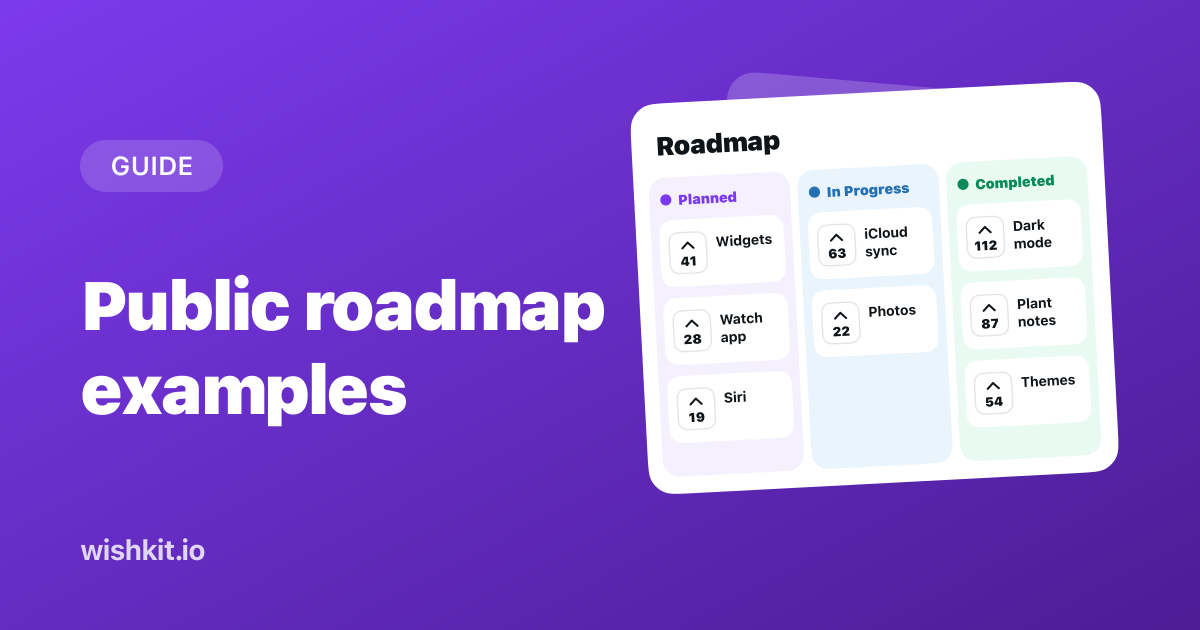
A public roadmap is a page where your users see what you're working on, what's next and what already shipped. The public roadmap examples below come from developer tools, SaaS products and apps on iPhone and Mac, and each one does at least one thing worth copying.
We checked about sixty public roadmaps on October 8, 2026 and kept the ones that are live and were updated in the last months. That ruled out a few famous ones. Trello's roadmap page now says "Page not found," and several products that used to publish a roadmap no longer do.
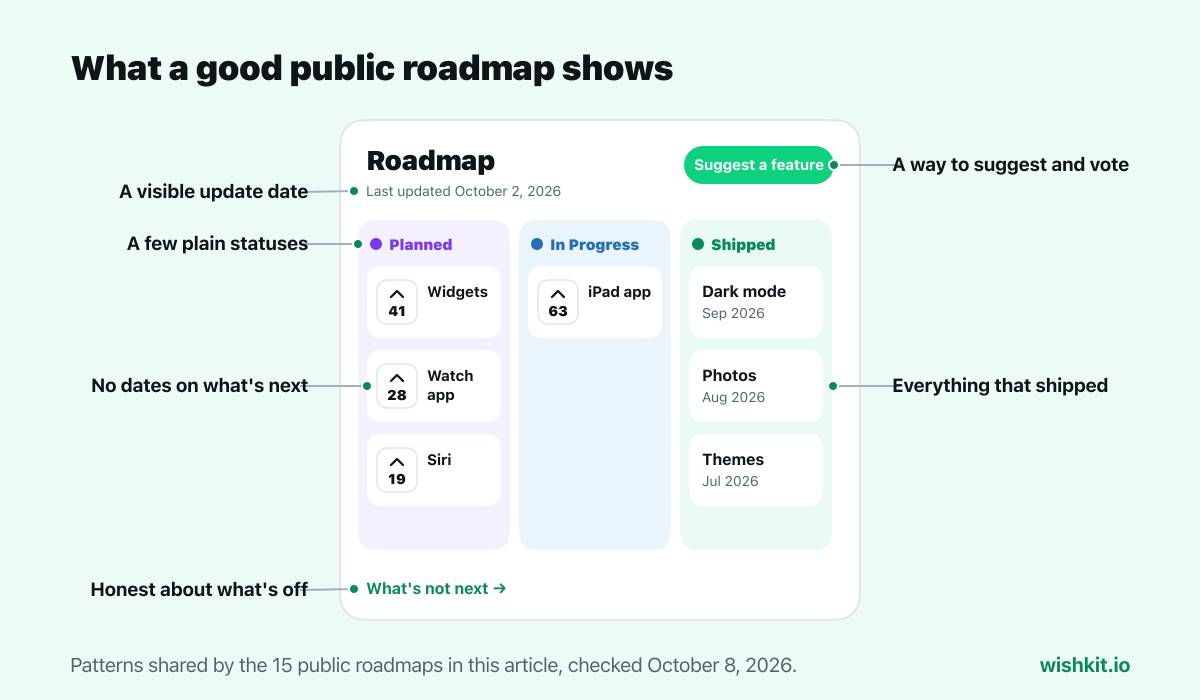
The good public roadmaps share a pattern. Three or four statuses named in plain words, like Planned, In Progress and Shipped. No exact dates, or rough windows instead. A visible list of what already shipped, a way for users to suggest or vote, and a note on when the page was last updated. Several go one step further and say what they won't build.
Statuses: Up Next, Exploring, Shipped, Paused · Votes: no · See the roadmap
GitHub runs its roadmap as a GitHub project, one issue per item, with the release phase in the title, like "[Public Preview]." The Paused column is the brave part. Most roadmaps quietly drop what stalled. GitHub shows it, and when an item ships, its issue is closed with a link to the changelog post.
Statuses: Researching, We're Working On It, Coming Soon, Developer Preview, Shipped · Votes: thumbs up on issues · See the roadmap
The roadmap for ECS, EKS and Fargate explains what each column means in time. Coming Soon is "Think a couple of months out, give or take." It also explains why there are no dates: "we can't provide specific target dates." Anyone with a GitHub account can open an issue, and the thumbs up on each one shows how many people want it.
Statuses: Currently Working On, Coming Up Next, plus a community board · Votes: yes, on GitHub · See the roadmap
The Mac code editor splits its roadmap in two. The top half is what the team is building. The bottom half, "Build Zed with Us," lists community requests with their vote counts and a Help wanted tag. The page says it plainly: "Every item here started as a community request."
Statuses: a table of what's in focus per area · Votes: no · See the roadmap
JetBrains updates the Kotlin roadmap twice a year and prints the next date on the page: "Next update February 2027." Each update lists what changed since the last one, including removed items. Saying "we dropped this" builds more trust than letting an item disappear.
Statuses: windows like (Live), (Late 2026), (Early 2027) · Votes: no, but a Request feature button · See the roadmap
Every item on the Creator Roadmap ends with a half-year window, and the page explains them: "Launch windows, e.g. (Early 2027), are approximate and subject to change." It adds that some features "may not launch at all," and stamps the page "Last updated: September 2026."
Statuses: Concept, Alpha, Beta · Votes: no, but waitlists · See the roadmap
PostHog's roadmap stops at Beta and points to its changelog for what shipped. What makes it different is that every card does something. Betas are "ready to enable today," and "anything coming soon has a waitlist," so a reader who wants a feature leaves an email instead of leaving.
Statuses: Exploring, Planned, In Progress, Released · Votes: yes · See the roadmap
Each card shows how many people voted for it. In the Released column, "Publish to Meta Threads" carries 7.9K votes, which tells every visitor that votes really move things. A roadmap with visible votes explains itself.
Statuses: Done, Beta, In progress, Not started · Votes: on a separate request board · See the roadmap
The form builder's roadmap is a two-column table, Feature and Status, and it shows Not started openly. It links to a separate board where people suggest and vote, and to the changelog. No columns, no cards, and nothing missing.
Statuses: In development, Rolling out, Launched · Votes: no · See the roadmap
Microsoft's roadmap is a searchable database. Every card has a Roadmap ID and dates for when it was added and last changed, and filters show what is new or changed within the last week or month. It also says what happens to cancelled items: they "will be removed from this website." Most roadmaps are smaller, but the idea scales down: mark what changed since the last visit.
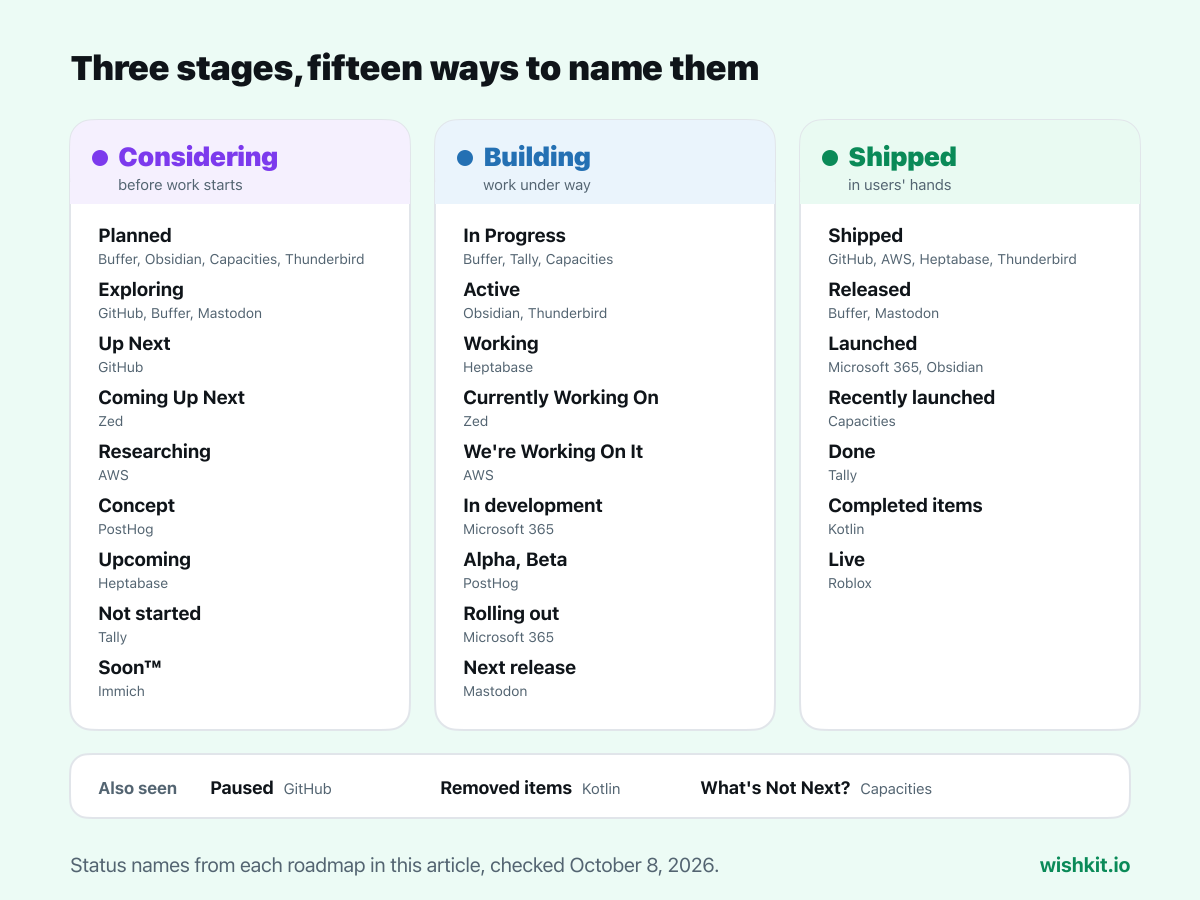
All fifteen roadmaps in this article move work through the same three stages. Only the names differ, which helps when you pick yours:
Statuses: Active, Planned, Launched · Votes: no, requests go to the forum · See the roadmap
Below a short list of what's active and planned, the Launched list runs month by month back to 2020, with version numbers. Years of shipped work under the plans is the best argument that the plans will happen too.
Statuses: Planned, In progress, Recently launched · Votes: yes, on its feedback board · See the roadmap
The notes app keeps its roadmap short and links to a second page, What's Not Next?, that lists requests it decided against, like a lifetime subscription and plugins, each with the reason. It answers the most common requests once, in public, instead of in every support thread.
Statuses: active work, planned and shipped, by month · Votes: no · See the roadmap
The roadmap for the new iOS app has a Download TestFlight app button right at the top, so anyone excited about an item can try the beta today. Progress is stated in words, like "Already 80% finished," and the page shows "Last updated July 23, 2026."
Statuses: Working, Done (Internal testing, not yet shipped), Upcoming, Shipped · Votes: no · See the roadmap
Most roadmaps jump from In Progress to Shipped. Heptabase has a stage in between for work that is finished but still in internal testing, which answers the question "it's done, so where is it?" before anyone asks. Its Shipped table goes back to 2021.
Statuses: future items marked Soon™, shipped items with a date and version · Votes: no · See the roadmap
The photo app's roadmap is a timeline with the future on top. Instead of inventing dates, upcoming items carry a wink: Soon™. Everything below it has a real date and a version number, which makes the joke easy to forgive.
Statuses: Released, Next release, Exploring · Votes: no, ideas go to GitHub · See the roadmap
A handful of cards, each naming the version it belongs to, like Version 5.0, and each explaining why the feature matters. A short roadmap that people actually read beats a long one nobody finishes.
| Product | Statuses | Users vote | Shipped history |
|---|---|---|---|
| GitHub | 4, including Paused | No | Yes, linked to the changelog |
| AWS Containers | 5, defined in time | Yes | Yes |
| Zed | Team plans plus community board | Yes | Releases page |
| Kotlin | Focus per area | No | What changed, including removals |
| Roblox | Launch windows | No | Live items and a changelog |
| PostHog | 3, up to Beta | Waitlists | Changelog |
| Buffer | 4 | Yes | Yes |
| Tally | 4, in a table | Separate board | Changelog |
| Microsoft 365 | 3 | No | Yes, with dates |
| Obsidian | 3 | No | Yes, back to 2020 |
| Capacities | 3, plus What's Not Next? | Yes | Recently launched |
| Thunderbird for iOS | 3 | No | Yes, by month |
| Heptabase | 4, including done but unshipped | No | Yes, back to 2021 |
| Immich | Soon™ or a date | No | Yes, with versions |
| Mastodon | 3, by version | No | Released cards |
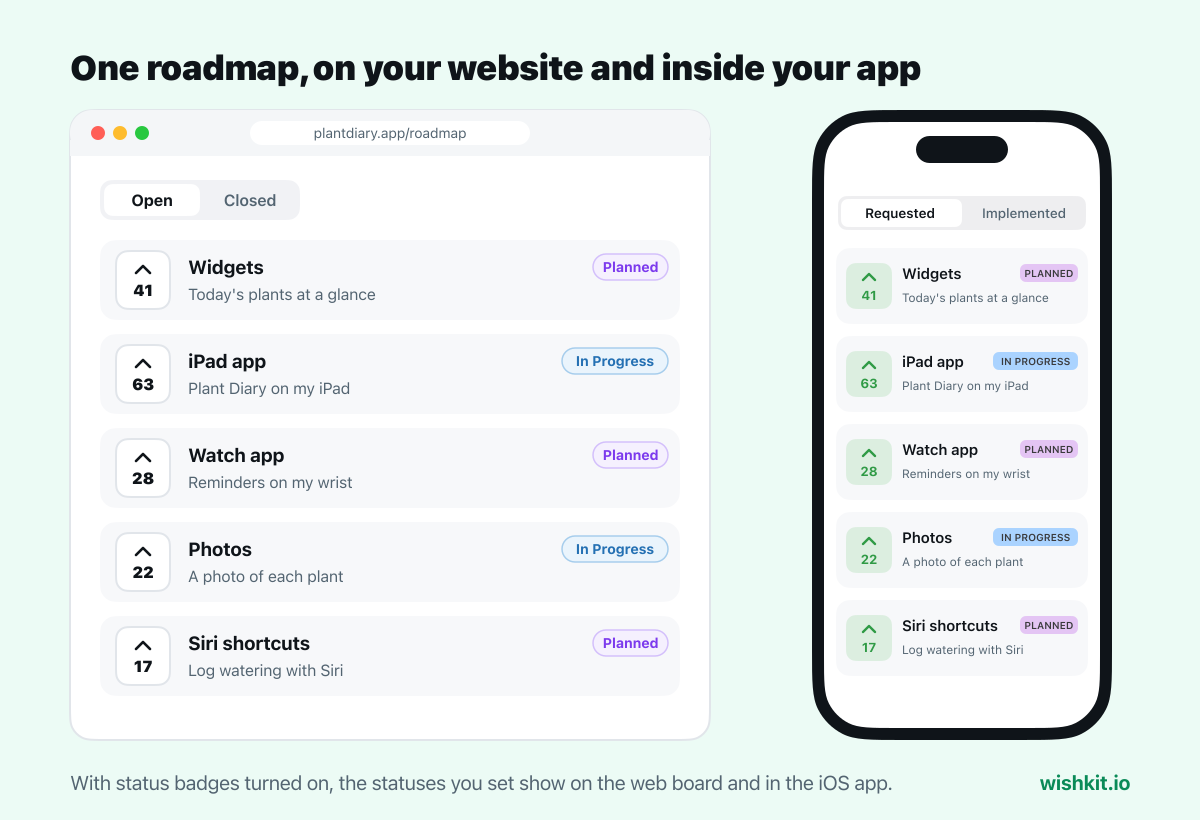
All fifteen roadmaps live on a website, so users only see them if they go looking. For an iPhone or Mac app, the better place is the app itself, next to the feature requests that feed it. Someone who asked for a feature sees it move from Planned to In Progress without leaving your app, and someone about to ask finds it's already planned.
That's how WishKit works. Users post requests and vote in a board inside your app or on your website, and you give each request a status in the dashboard: In Review, Planned, In Progress or Completed. With status badges turned on, the board becomes your public roadmap.
On a website, add one attribute to the embed:
1 <div data-wk-anchor data-wk-project-key="your-project-key" data-wk-badges="on"></div>
2 <script async src="https://www.wishkit.io/sdk/wishkit-web.js"></script>
In an iOS app, one line after you configure the SDK:
1 WishKit.configure(with: "your-api-key")
2 WishKit.config.statusBadge = .show
The rest comes with it:
When a request moves to Completed, tell the people who asked. The close the feedback loop guide covers who to tell and when, and App Store release notes covers the announcement everyone else sees. Setting up the board in a SwiftUI app takes a few minutes with the SwiftUI tutorial, and on a website with two lines of HTML.
A page your users can see that shows what you're building, what's planned and what already shipped. Most use a few statuses rather than a timeline, and many let users suggest or vote on what comes next.
Usually not. None of the fifteen roadmaps above gives upcoming work an exact day. They use rough windows like "Late 2026," version numbers, or no dates at all, because a missed date costs more trust than no date.
Three or four, in plain words. Planned, In Progress and Shipped or Completed cover most products. Add an early stage like In Review or Exploring if you want to show what you're considering without committing to it.
Competitors can already see your app and your release notes. A roadmap mostly shows them what your users asked for, while it shows your users that asking works. Keep anything truly secret off it, and publish the rest.
A roadmap looks forward: what's planned and in progress. A changelog looks back: what shipped and when. The best roadmaps link to their changelog, or keep a shipped list on the same page.
Add a feature request board with statuses to the app. With WishKit, set WishKit.config.statusBadge = .show and each request shows its status, In Review, Planned, In Progress or Completed, right in the app.
Setup takes less than a minute. Free plan included, no credit card required.
Try WishKit for free