Everything you need to decide before you pay: the fee, the free alternative and its limits, individual or organization, and the steps Apple takes you through. All in Apple's own words.
By Martin Lasek · Oct 8, 2026 · 7 min read
The Apple Developer Program costs 99 USD a year, charged in local currency where available. You need it to put an app on the App Store or send it to TestFlight testers. A free Apple developer account is enough to build apps and run them on your own devices, with limits. You enroll either as an individual, and your legal name appears as the seller, or as an organization, which needs a legal entity and a D-U-N-S Number. Nonprofits, accredited educational institutions and government entities can ask for a fee waiver.
"The Apple Developer Program is 99 USD per membership year. Prices may vary by region and are listed in local currency during the enrollment process."
Three details change what you actually pay:
Anyone with an Apple Account can register as an Apple developer for free. Apple's comparison, accessed October 8, 2026:
| Feature | Free account | Developer Program | Enterprise Program |
|---|---|---|---|
| Beta versions of Xcode and the OS | Yes | Yes | Yes |
| Testing on your own devices with Xcode | Yes | Yes | Yes |
| Developer Forums, Feedback Assistant | Yes | Yes | Yes |
| Code-level support | No | Yes | Yes |
| Certificates, Identifiers and Profiles | No | Yes | Yes |
| Mac software notarization | No | Yes | Yes |
| App Store Connect | No | Yes | No |
| TestFlight | No | Yes | No |
| Xcode Cloud | No | Yes | No |
The free account runs your app on your own iPhone through what Xcode calls a Personal Team, and Apple keeps it short-lived:
"You can register up to 10 App IDs, which expire after 7 days."
"You can register up to 3 devices, which expire after 7 days."
"You can install up to 3 apps per device. Provisioning profiles that enable apps to be installed on a device will expire 7 days from issuance."
That is plenty for learning and for trying an idea on your own phone. Once you want testers or the App Store, you need the membership: App Store Connect and TestFlight are only part of the paid program.
This is the one decision that is hard to undo, because it decides whose name the App Store shows as the seller of your apps.
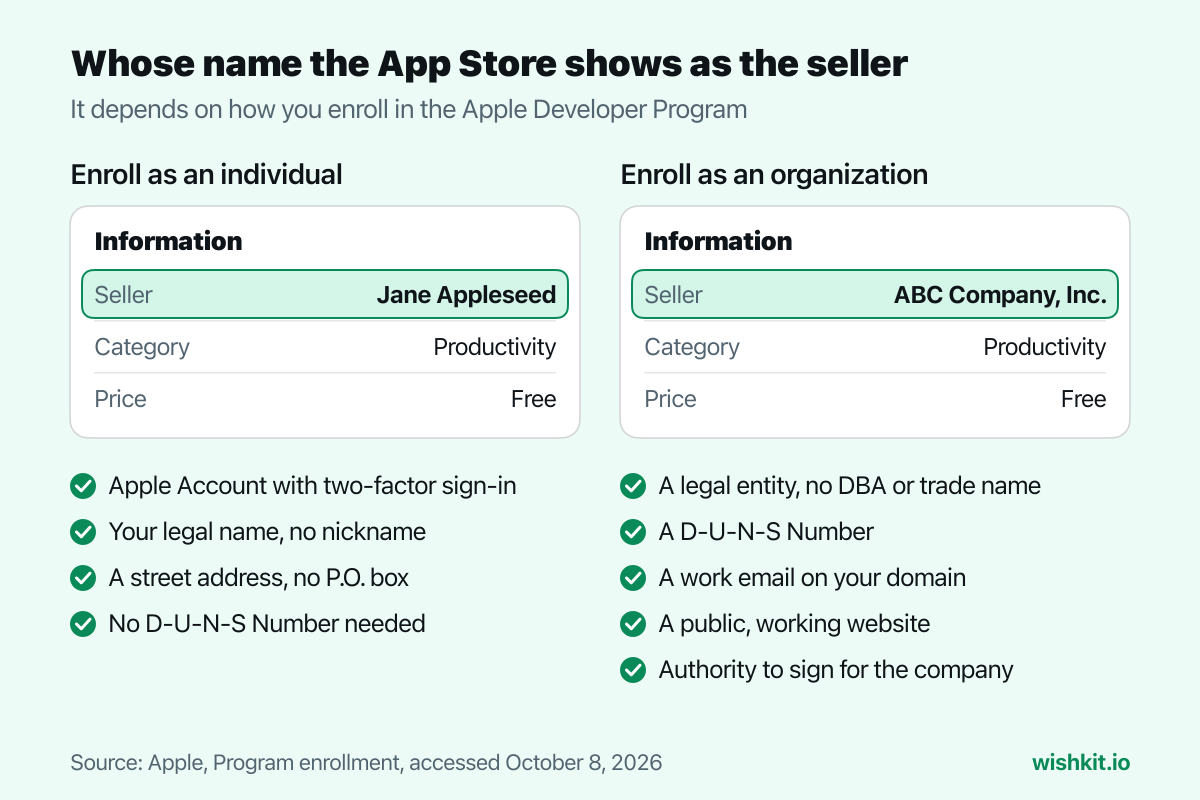
As an individual, including a sole proprietor or single-person business, your personal legal name is the seller. You need an Apple Account with two-factor authentication, your legal name in the first and last name fields, and a street address. Apple says P.O. boxes aren't accepted, and an alias or company name in the name fields delays your approval.
As an organization, the legal entity's name is the seller. Apple checks a few things first:
Apple may also ask an organization for notarized business documents. If you start as an individual and later found a company, Apple's enrollment FAQ says to contact them to convert the account to an organization.
A D-U-N-S Number is a nine-digit business identifier from Dun & Bradstreet, and Apple uses it to verify your organization. Individuals don't need one. Apple says it's free in most jurisdictions, and gives these waiting times:
"After requesting a D‑U‑N‑S Number, please allow up to 5 business days to receive your number from D&B."
"Once you receive your D‑U‑N‑S Number, please allow up to 2 business days for Apple to receive your information from D&B."
Look up your company first, since Dun & Bradstreet may have assigned one already. If enrollment says "Your organization is not listed as a legal entity", D&B has your business under a different status, for example as a sole proprietorship. Then you either enroll as an individual or send D&B your registration documents to correct it.
A nonprofit organization, an accredited educational institution or a government entity can ask Apple to waive the fee. Apple's conditions: it can't be an individual, sole proprietor or single-person business, it can't have signed the Paid Applications Agreement to sell apps or in-app purchases, and it can't sell digital goods or services in any of its apps. New members choose the waiver during enrollment, existing ones can request it before their membership expires, and it's re-confirmed at every renewal.
There is no student program. Apple points students to the free account, and their school can enroll with a fee waiver.
"If your Apple Developer Program membership expires, your apps will no longer be available for download and you won’t be able to submit new apps or updates or access Certificates, Identifiers & Profiles. However, your apps will still function for users who have already installed or downloaded them"
Renew later and you don't have to resubmit anything. Apple says free apps come back within 24 hours, and paid apps once you accept the Paid Applications Agreement again in App Store Connect.
The membership fee is separate from Apple's commission on paid apps and in-app purchases. Apple described its standard rate in 2020 as "The App Store’s standard commission rate of 30 percent". Through the App Store Small Business Program, developers who made up to 1 million USD in proceeds in the prior calendar year, and developers new to the App Store, can get "a reduced commission rate of 15% on paid apps and Apple In-App Purchases". You have to enroll in it separately, as the Account Holder. Some regions, like the EU, also have alternative terms with their own fees.
Your first stops are usually TestFlight for beta testing, the App Store Review Guidelines before you submit, and screenshots at the right sizes, next to an app icon at 1024 × 1024 pixels. And once people use your app, WishKit lets them request and vote on features inside it, so you know what to build next.
99 USD per membership year, in local currency where available, plus tax where it applies. The Apple Developer Enterprise Program costs 299 USD a year.
Yes. With your Apple Account you get Xcode and OS betas, the forums, Feedback Assistant, and testing on up to 3 of your own devices. App Store Connect and TestFlight need the paid membership.
Only with a fee waiver, which is limited to nonprofits, accredited educational institutions and government entities that don't sell digital goods. Everyone else needs the paid membership.
Apple gives no total. It asks you to contact support if the confirmation hasn't arrived within 24 hours of your purchase. Organizations wait longer, since Apple verifies them before they can pay, and a new D-U-N-S Number can take up to 5 business days plus 2 for Apple to receive it.
No. Only organizations need one, and government organizations are exempt.
No. To show a company as the seller, it must be a legal entity enrolled as an organization. An individual membership can be converted later by contacting Apple.
Setup takes less than a minute. Free plan included, no credit card required.
Try WishKit for free