One div, one script tag, and your site has a feature request board where users post ideas and vote. No npm package, no build step, no iframe.
By Martin Lasek · Sep 4, 2026 · 7 min read
This guide embeds a feature request board on a website using the WishKit web SDK, our product. It works on any page that lets you add HTML: a hand-written site, a SaaS app in React or Vue, a Webflow or Framer page, a WordPress page with a custom HTML block. The board renders inline where you put it, inside its own Shadow DOM, so your CSS and its CSS never touch.
What you need: a free WishKit account and the project key from its dashboard. That is it.
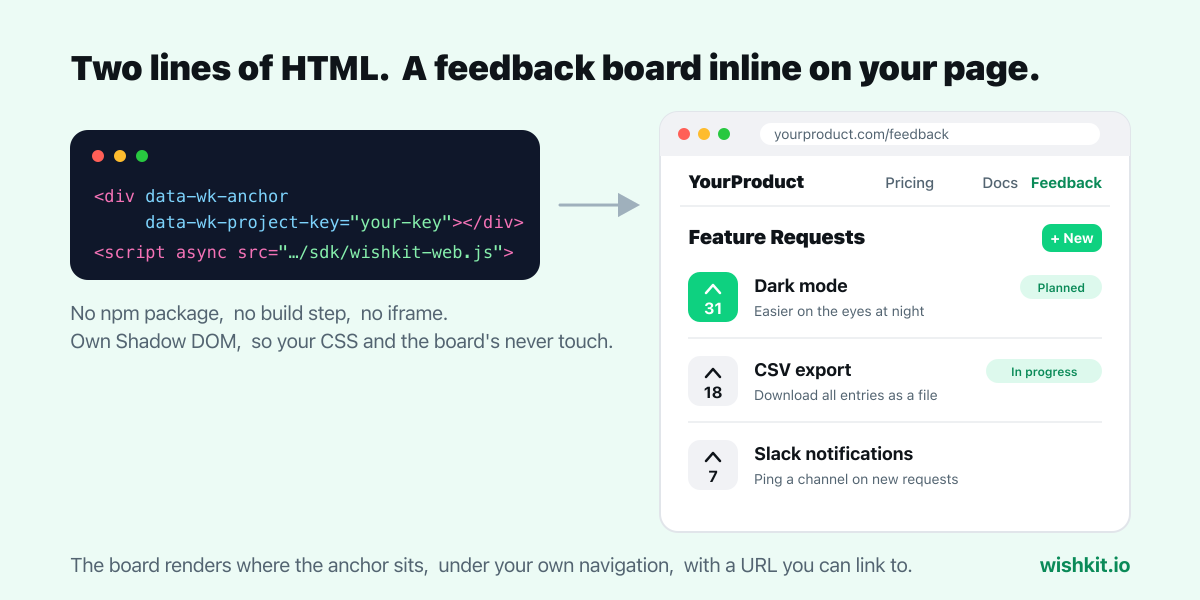
Put the anchor where the board should appear on the page, and the script tag anywhere after it, typically right below it or before the closing body tag.
1 <div data-wk-anchor data-wk-project-key="your-project-key"></div>
2 <script async src="https://www.wishkit.io/sdk/wishkit-web.js"></script>
Reload the page. The board is there: a list of requests sorted by votes, a tab for completed ones, a create button, and vote buttons that work without any account. The script only needs to be on the page that shows the board, not sitewide.
Everything optional is an attribute on the anchor, so there is no configuration object to maintain.
| Attribute | Values | What it does |
|---|---|---|
data-wk-badges |
on |
Shows status badges such as Planned, In Progress and Completed on each request |
data-wk-comments |
on |
Lets users read and write comments in a request's detail view |
data-wk-theme |
light, dark, auto |
Color scheme. Auto follows the visitor's system setting. Default is light |
data-wk-watermark |
off |
Hides the "Powered by WishKit" line. Takes effect on paid plans |
1 <div data-wk-anchor
2      data-wk-project-key="your-project-key"
3      data-wk-badges="on"
4      data-wk-comments="on"
5      data-wk-theme="auto"></div>
Visitors can post and vote anonymously, and the board keeps their votes consistent across visits on its own. If your product already knows who the user is, pass it along, and the dashboard shows requests with real names and emails instead of anonymous IDs. If you also know what they pay you per month, pass that too, and you can sort requests by the revenue behind them.
The simplest way is more attributes on the anchor, rendered server-side or by your framework with the signed-in user's data:
1 <div data-wk-anchor data-wk-project-key="your-project-key"
2      data-wk-user-email="jane@example.com"
3      data-wk-user-name="Jane"
4      data-wk-user-id="user_8AHD1IL03ACIP"></div>
Or call the SDK from JavaScript once it has loaded, which is the natural fit when the user signs in after the page rendered:
1 WishKit.identify({
2     email: "jane@example.com",
3     name: "Jane",
4     customID: "user_8AHD1IL03ACIP",
5     paymentPerMonth: 15
6 });
Only pass what you already have. Do not add a sign-up wall in front of the board to collect emails. Anonymous votes are still votes, and the wall costs you most of them.
The script looks for anchors once, when it loads. On a plain HTML page that is always after the anchor exists. In React, Vue, Svelte, Next.js and similar apps the feedback page is a component that may mount after the script ran, so the anchor is not there yet when the script looks.
Two ways to handle it. Either render the anchor in the feedback page component and load the script from that component after it mounts, or include the script on the page and only navigate to the feedback route with a full page load. The first is cleaner and is what most teams do: add the script tag in an effect that runs when the feedback component mounts.
Give the board its own page at a URL people can guess, such as /feedback or /feature-requests, and link it from the main navigation or the footer. If your app has a Help or Support area, a link there works too. Label the link "Feedback" or "Feature Requests". Users scanning for where to complain do not recognize clever names.
A board also works right under the thing people came for. Our free X Circle tool has one below it, and what visitors asked for there is in the X Circle story.
The board is inline, not a floating launcher, which matters for two reasons. It gets a real URL you can link to from emails, release notes and support replies, and it does not sit on top of your product's interface on every page competing with your own calls to action. The full argument is in feedback widget vs inline feedback board.
If you also ship an iOS or macOS app, the same project has a native SwiftUI SDK. Both render the same list, so a request posted on the website is voted on in the app and vice versa, and you manage one board instead of two. The app side takes about as long as this did. See how to add a feedback board to a SwiftUI app.
No. The board renders inside a Shadow DOM with its own styles. Your stylesheet does not leak in and the board's styles do not leak out. The theme attribute is how you match light or dark mode.
No. Votes work anonymously and stay consistent for the same visitor. Identification is optional and only changes what you see in the dashboard.
Anywhere you can add a custom HTML block that allows a script tag. Paste the two lines into that block on the page that should show the board.
No, and that is deliberate. The script tag has no dependencies and no build step, and it is served from the same URL for every customer, so updates reach your site without a deploy on your side.
Yes to start. The free plan includes one project with the board, voting, and unlimited users. Premium is a flat $15 a month, or $12.50 billed yearly, for two projects plus comments, user notifications, and branding removal. See the web feedback board page for the full picture.
WishKit lets your users request features and vote on them, in your app or on your website, so you know what to build next.
Try WishKit for freeFree plan included, no credit card required.
